Digital Legal Concierge
A system that organises a law firm’s whole work on a case, from the client’s first request to the actual recovery of money. We start with disputes against developers under shared-equity construction contracts (Federal Law 214-FZ).
MVP
Developer disputes · 214-FZ · Telegram for the client · Staff workspace.
Summary
- Digital Legal Concierge is a system that runs a law firm’s case from the client’s first request to recovery. We start with disputes against developers under shared-equity construction contracts (Federal Law 214-FZ). Stage: MVP.
- Clients work in Telegram, staff in a workspace with administrator, lawyer and operator roles. Two routes: penalty recovery and a personal consultation.
- The goal is not to replace the lawyer but to remove the administrative load on repeatable cases: intake, review, deadlines, documents and payments are handled by the system.
- The project is entirely mine. I am looking for a law firm for a pilot, and for a buyer or partner. Terms and prices are in the “Terms” section.
01 — Diagnosis
Lawyers lose time on work that is not legal judgement
In standard disputes with developers most of the time goes on work that needs no lawyer’s decision.
-
Intake and calculation by hand
Every request has to be clarified and the penalty recalculated before a lawyer even makes a decision.
-
Documents and deadlines in different places
Files sit in chats and mail, deadlines in calendars and spreadsheets: it is easy to miss a developer’s reply or a court event.
-
The load grows with the number of cases
Each new request needs the same administrative work, so repeatable cases do not scale without adding staff.
02 — Principle
Not a consultation bot, but a case-management system
Digital Legal Concierge organises the whole process of working on a case.
There are plenty of legal services, and there is little point in entering the market with yet another consultation bot. Digital Legal Concierge is built differently: it is not a tool for talking to a lawyer but a system that organises the whole process of working on a case.
The client completes a preliminary calculation, submits documents and follows the progress. For a law firm it is a single system for client intake, review of requests, case allocation, deadline control, documents, payments and staff work.
The aim is not to replace the lawyer but to give a firm a ready tool with which it handles more repeatable requests without a proportional rise in administrative load.
-
Specialisation
The system is built for one type of dispute, so every step, document and deadline is familiar to the lawyer.
-
Connected automation
Not a single feature but the whole route of a case: intake, review, allocation, payment, deadlines and recovery.
-
Replication
The same framework can be configured for different law firms, and lawyers will be able to develop it for other standard disputes.
03 — Who it is for
Client, lawyer and administrator see the same case
Every role has its own interface on shared data: the client in Telegram, staff in the workspace.
-
Law firm
One system for intake, review, case allocation, deadline control, documents and payments.
-
Client
In Telegram: runs the penalty calculation, uploads documents, follows the case status, pays stages and books a consultation.
-
Lawyer
Sees only their own cases and consultations: what needs action, which documents await a decision, which court events are ahead.
-
Administrator and operator
Case queues, lawyer assignment, deadline control, payments and notifications; the operator replies to clients.
04 — Case route
From request to recovery
Two routes: penalty recovery and a personal consultation. The first goes through these stages.
-
Request and calculation
The client leaves a request in Telegram and gets a preliminary penalty calculation.
-
Documents
The client uploads the contract and supporting documents; files are checked and stored encrypted.
-
Lawyer review
A lawyer reviews the package and decides: take the case, ask for documents or decline.
-
Contract and payment
The client signs the contract and pays the first stage, and the system starts the deadlines.
-
Claim
The lawyer prepares and sends the claim to the developer; the system tracks the reply deadline.
-
Court
The statement of claim, court events and the decision are recorded in the case.
-
Recovery
Enforcement proceedings, receipt of funds and closing the case with a clear reason.
05 — Security
Reliability and security
The system holds clients’ documents and money, so protection is built into its core.
- Two-factor sign-in for staff and separation of roles
- Documents are stored encrypted
- An audit log of actions and deadline control
- Backups and recovery
06 — Stage
What is already built
What already works and what comes next.
Done
- The bot and the staff workspace, routes for penalty recovery and consultation, payments, documents, audit and backups. The scope of the MVP is fixed.
Now
- Preparing for a pilot: testing in real Telegram, connecting a payment service, moving to PostgreSQL and a document store.
Next
- A pilot on several real cases of a law firm, then extension to other standard disputes.
Looking for I am looking for a law firm for a pilot, and for a buyer or partner to develop the product further.
07 — What it looks like
A working workspace instead of a description
The real interface of the system on demonstration data: fictitious clients and cases.
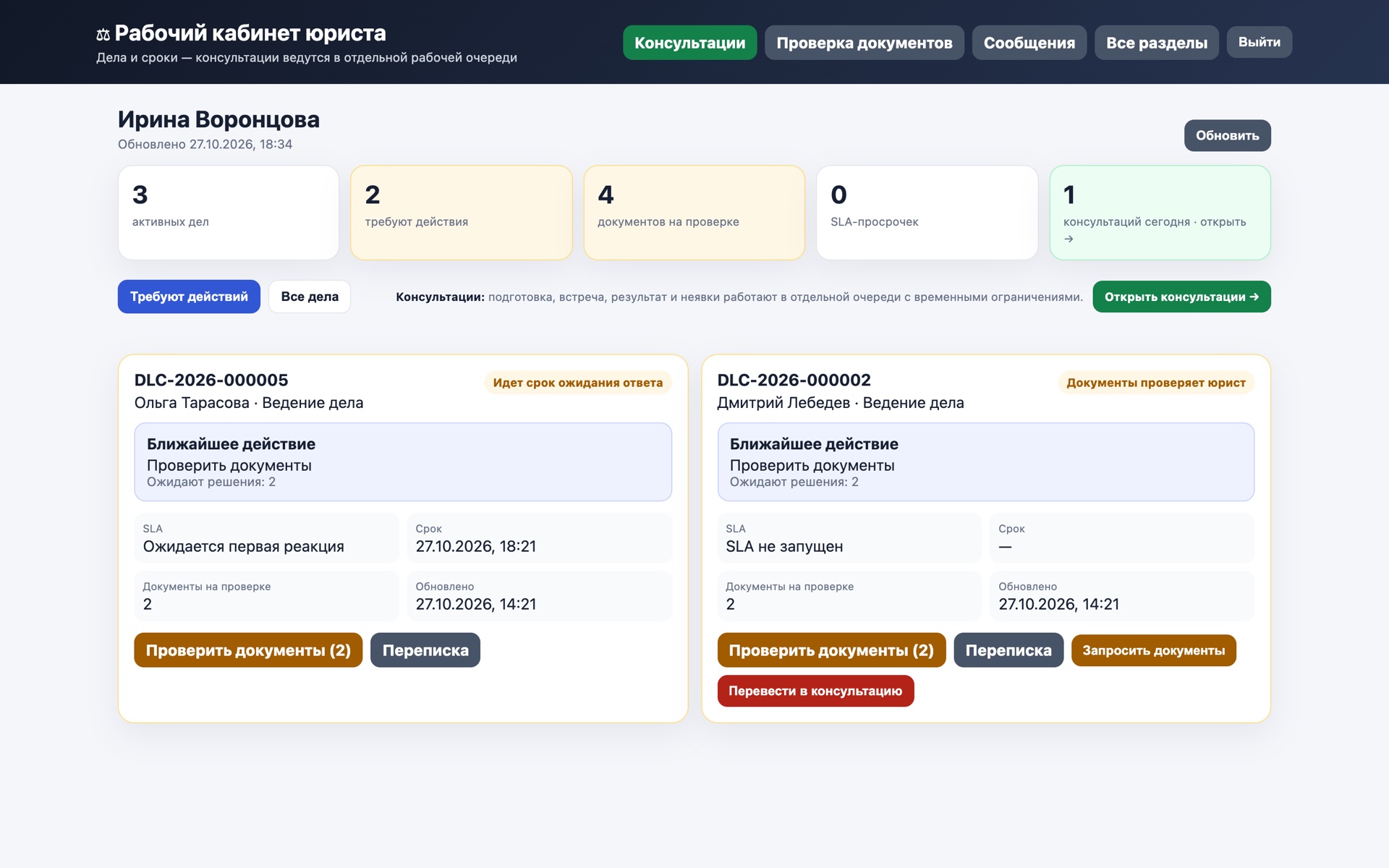
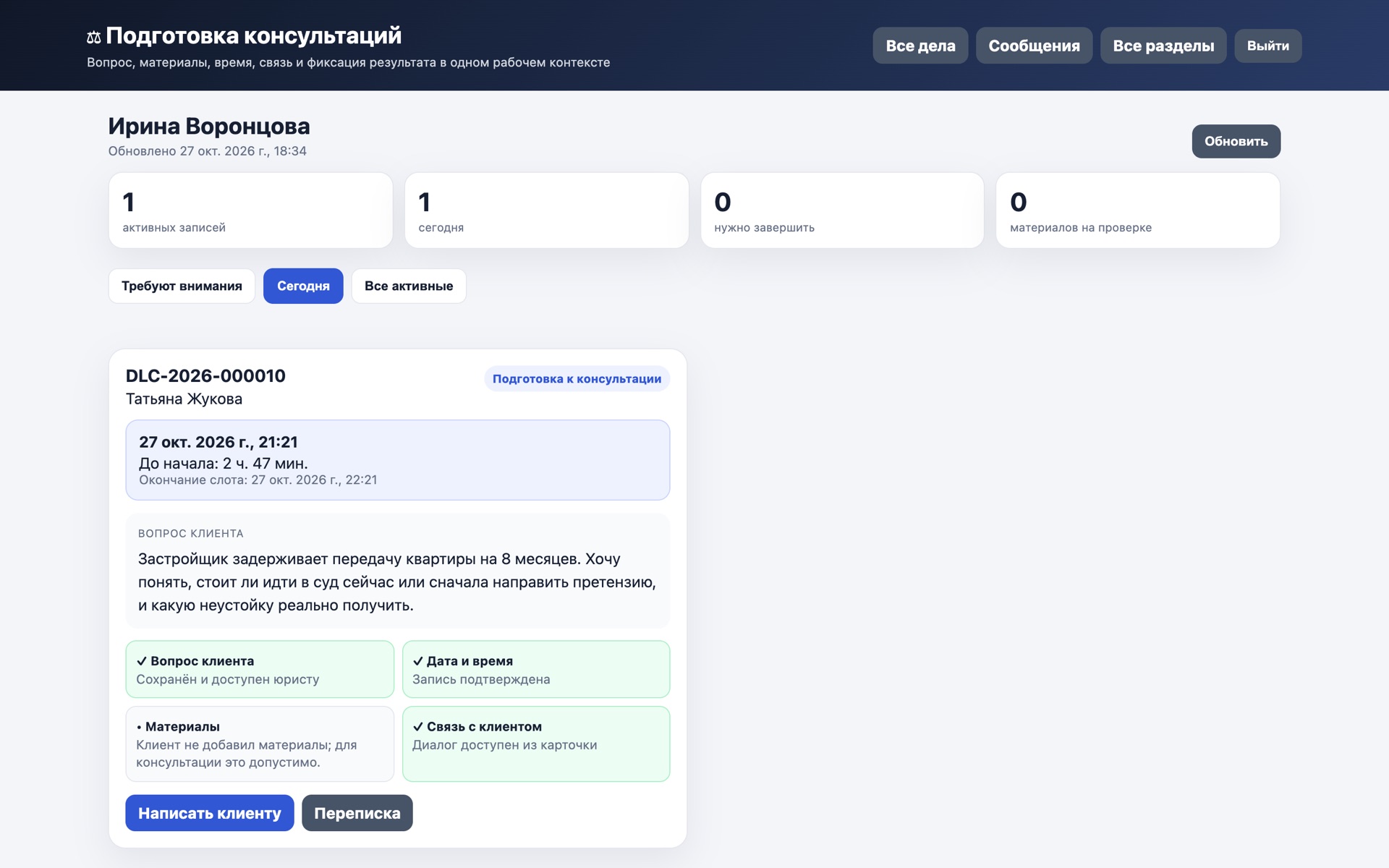
Tap a screenshot to open it full screen, then swipe through.
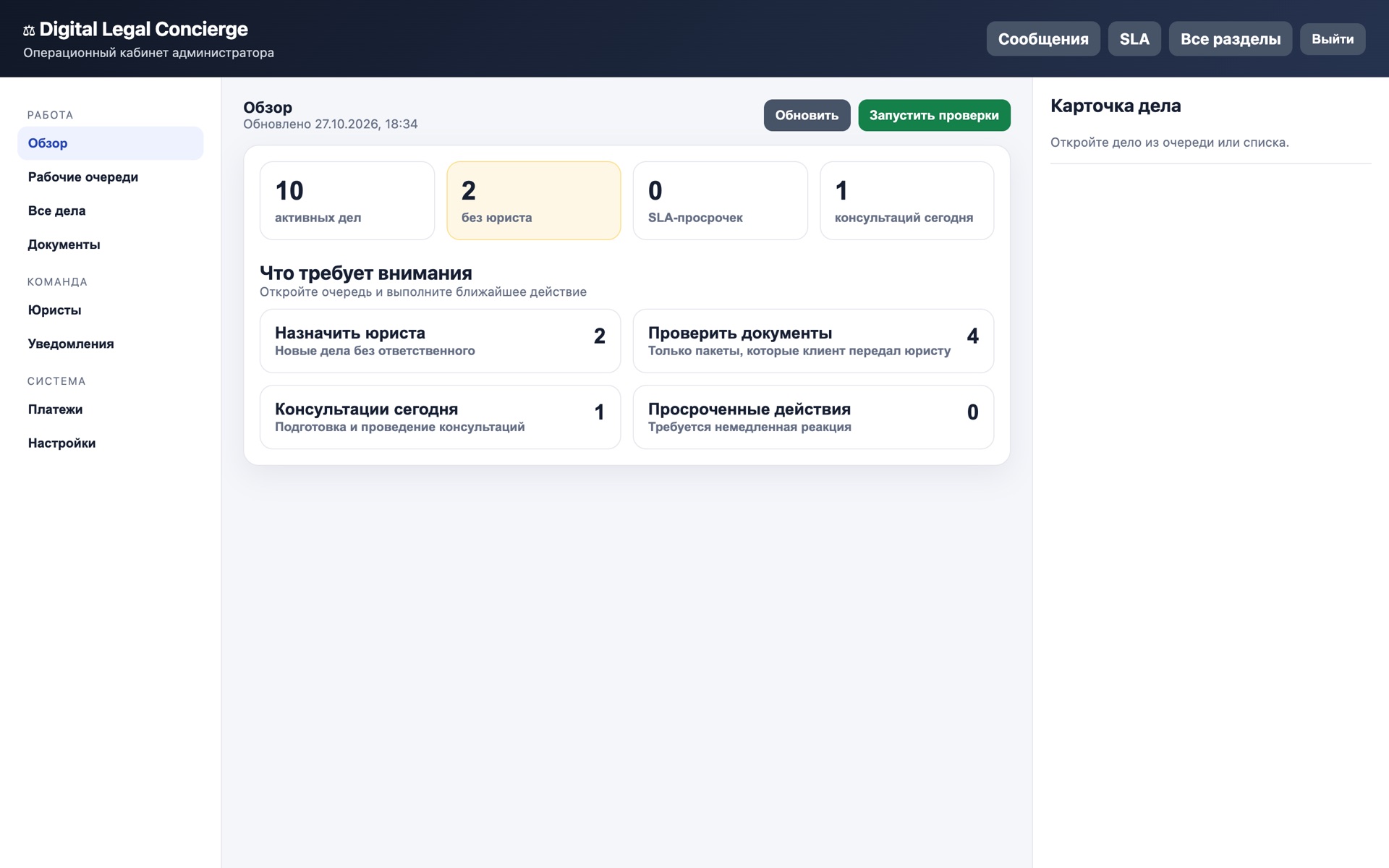
- Administrator overview. Active cases, cases without a lawyer, missed deadlines and the day’s consultations. Work queues open in one click.
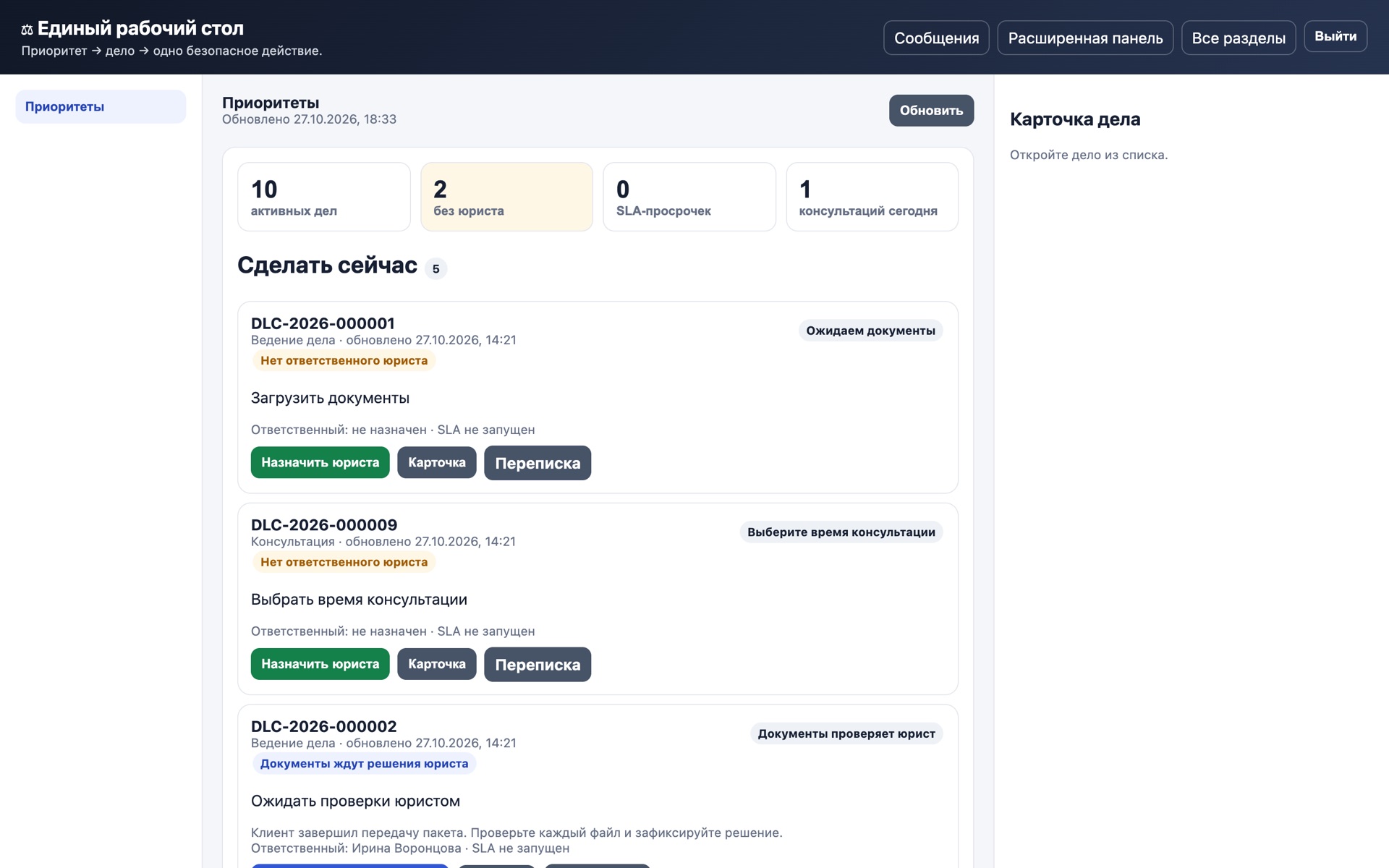
- Unified workdesk. A “Do now” list: each case has a status, the reason it needs attention and a safe action: assign a lawyer, open the card, jump to the conversation.
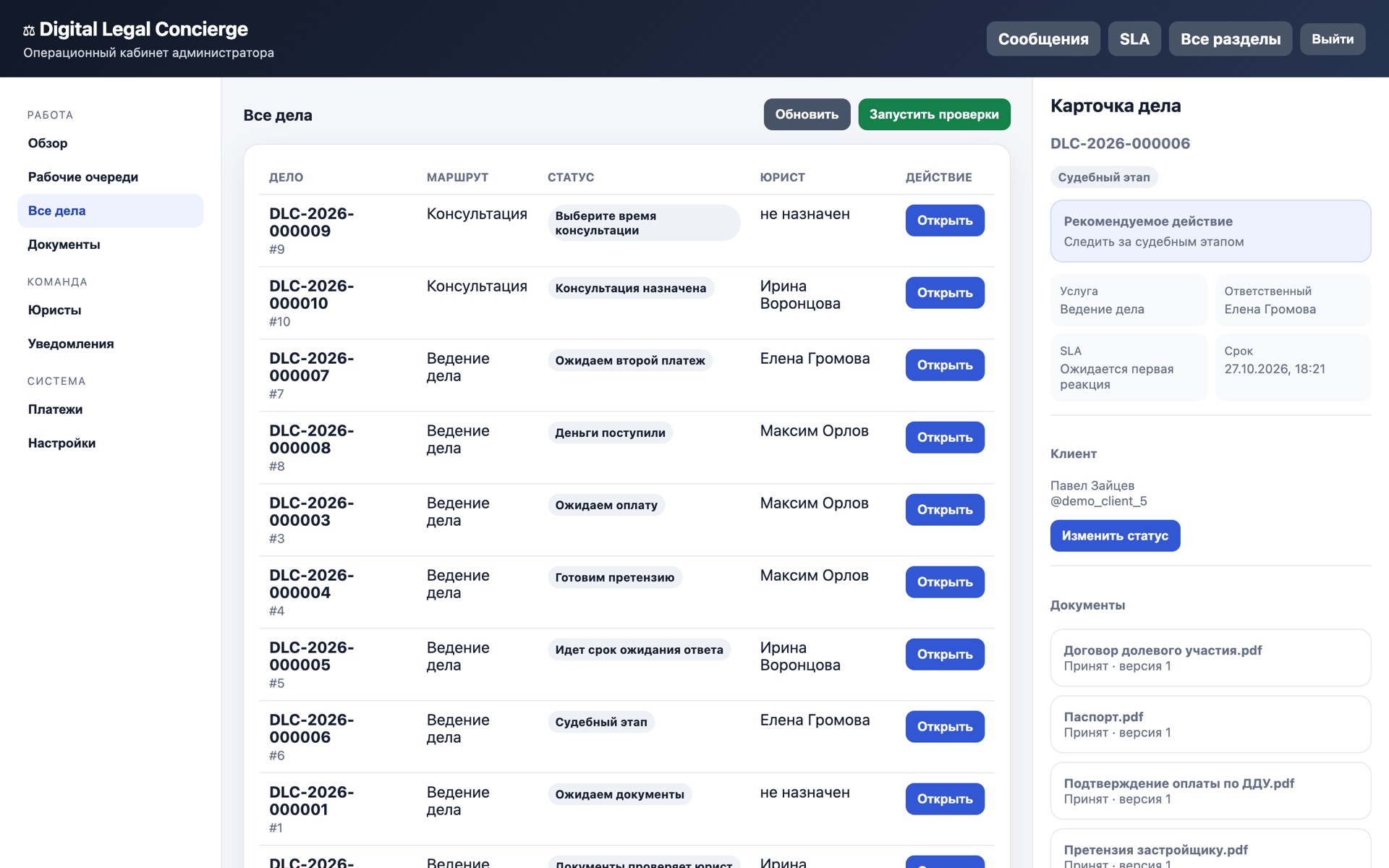
- Case card. Stage, recommended action, responsible lawyer, response deadline, client and every document of the case in one window.
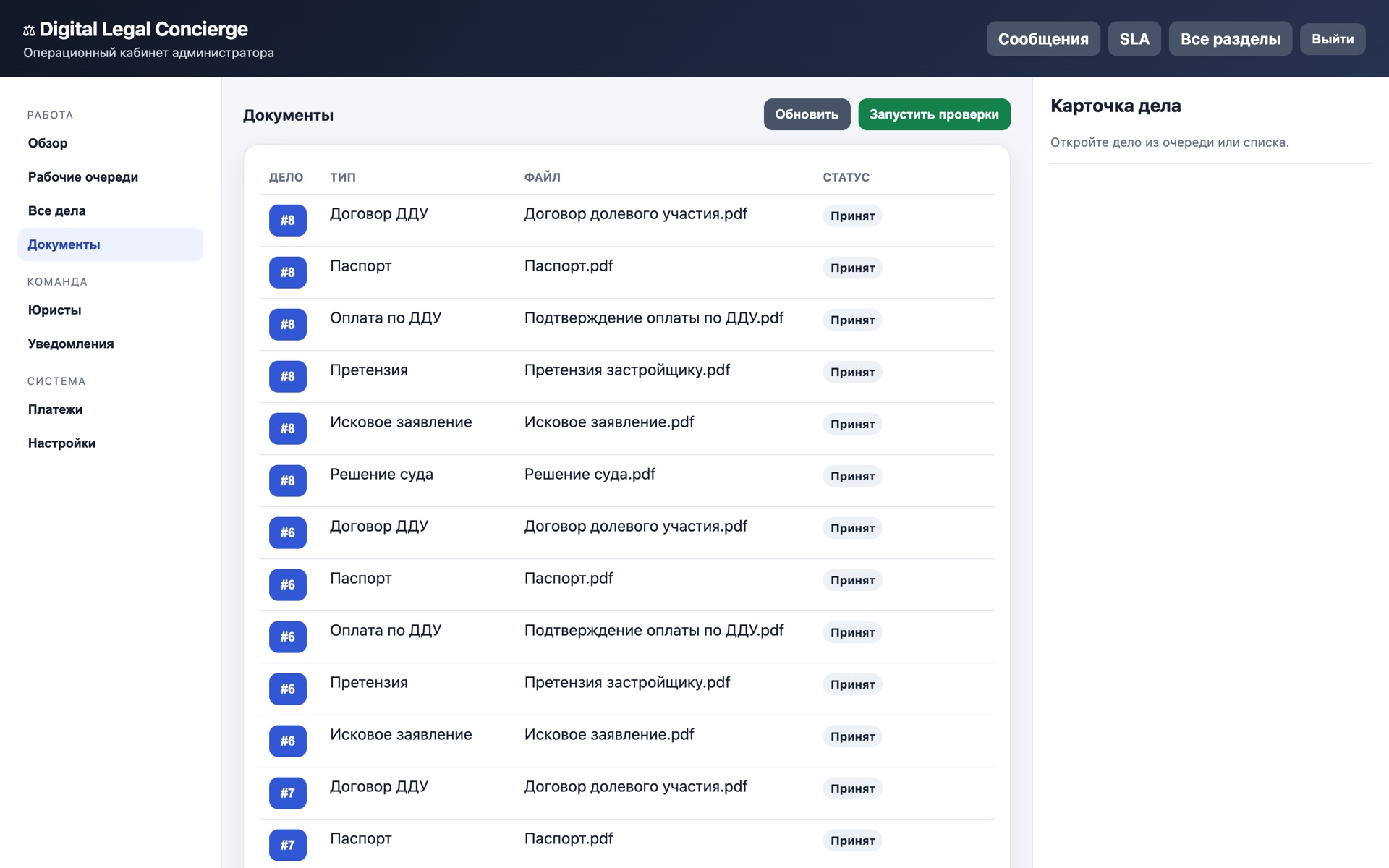
- Documents. Documents of all cases with type, file name and review status: “Accepted”, “Under lawyer review”, “Re-upload needed”.
- Lawyer workspace. A lawyer sees only their own cases: what needs action, how many documents wait for a decision and which consultation is today.
- Consultation preparation. The client’s question, time and countdown, readiness checklist and a “Write to client” button in one working context.
Video, 36 seconds: the administrator workdesk, a case card and the lawyer workspace in the running system. Demonstration data.
08 — Terms
How the project can be acquired
Two options. Terms are confirmed by documents; details on request.
-
100% of the rights — RUB 2,200,000
Exclusive rights to the software within the confirmed scope. Handover of the codebase. The whole amount goes to the seller.
-
50% of the company — RUB 1,900,000
A share in the LLC under a corporate agreement. Clear ownership of the rights to the software. RUB 1,100,000 to the seller, RUB 800,000 into developing the project.
What a deal goes through
- Technical acceptance: an end-to-end scenario from client to lawyer
- Legal acceptance of the 214-FZ calculations and of consent to data processing
- Documents on the rights to the software and the components used
- Handover: backups, keys, instructions
- A pilot on real requests
The project belongs entirely to me, so terms can be agreed directly.
09 — Next step
If this is close to you
Tell me what interests you: running the system in your firm, discussing a purchase, or learning more. I reply within a working day.